
In this article, we will learn about some common metrics in SEO, such as clicks, impressions, rankings, and more. Understanding these metrics and how they are calculated is immensely helpful for carrying out subsequent SEO work and reviews. These metrics can quickly let us know the current operational status of the website.
What is Ranking?
Before understanding ranking, we need to first determine who the main subject of the ranking is. Because this "ranking" can be the ranking of the website, the ranking of a specific page within the website, or even the ranking of a certain keyword for the website. So when your boss asks you, "How are the rankings this week?", they are most likely asking about the average ranking of all the pages on the website over the past week.
Saying it like this might be a bit abstract, so let me explain in detail how rankings are determined, and you will probably understand.
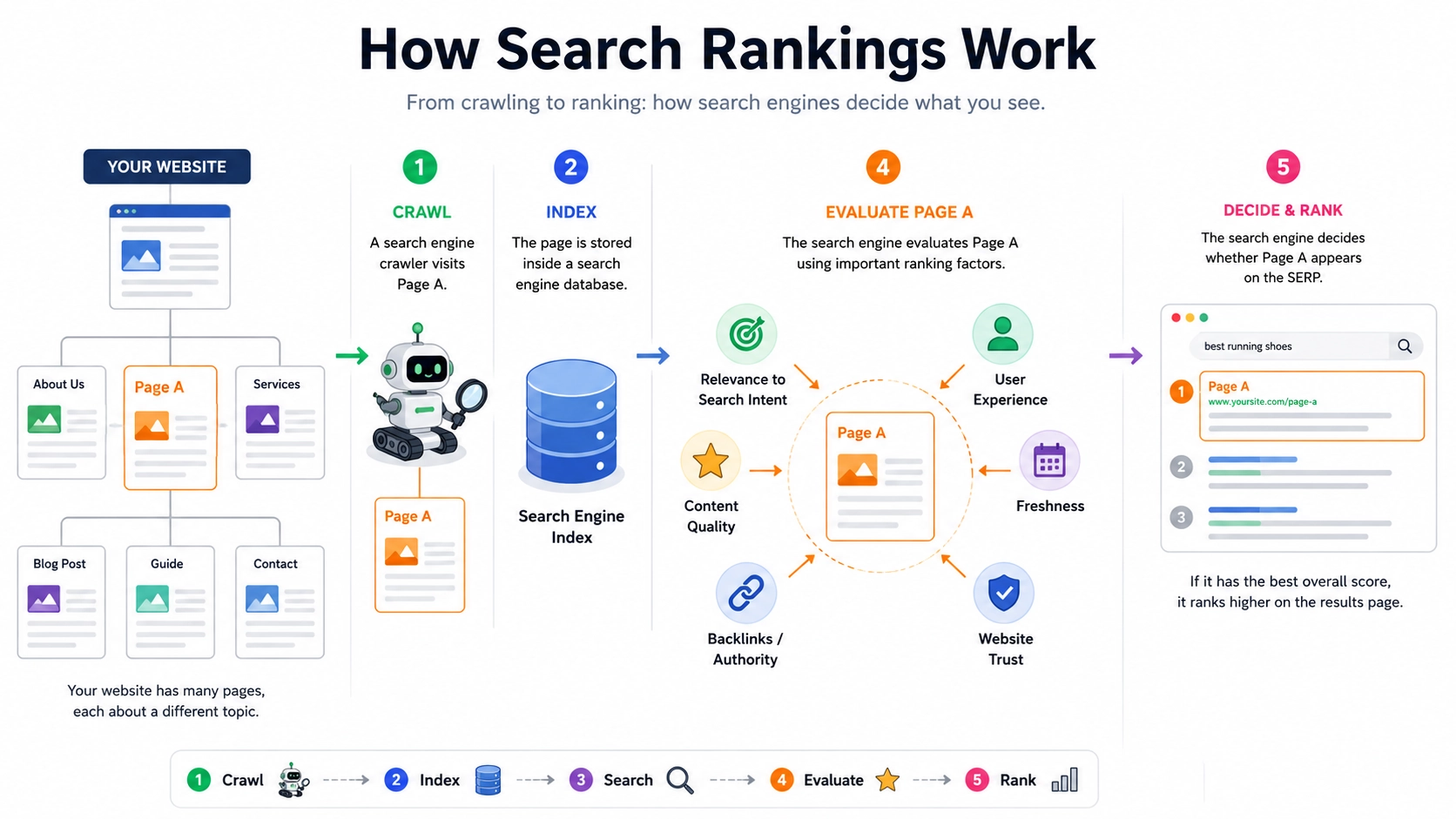
Normally, a website contains many pages, and each page revolves around a core topic to develop its content. When Page A is crawled and indexed by search engine crawlers, the search engine will conduct a relevance analysis and quality assessment of Page A's content based on the search term currently entered by the user. This includes, but is not limited to:
- The match degree between the page's topic and the search intent
- Content quality and information completeness
- Page authority and backlink signals
- User experience metrics
- Page timeliness
- Overall website quality and other factors
Subsequently, the search engine will determine whether Page A is qualified to enter the Search Engine Results Page (SERP) for this particular search to be displayed.
Once Page A is displayed in the SERP, it corresponds to a ranking position. However, this ranking is not a fixed ranking for the page, but rather:
The relative sorting position obtained by Page A in the search result environment corresponding to the "user's current search term".
In other words, the essence of a page ranking is:
The sorting result of "a certain page" for "a specific search term" in "a particular search results page".
Therefore:
- The same page facing different search terms will produce different rankings;
- The same search term under different regions, devices, times, and user profiles might also result in changes in ranking;
- Ranking is dynamically calculated, not a naturally fixed attribute possessed by the page.
For example:
- Page A searching for "Python tutorial" might rank 3rd;
- Searching for "learning Python from scratch" might rank 15th;
- Searching for "programming for beginners" might not enter the SERP at all.
So, from an SEO perspective:
The core unit of ranking is actually the combination relationship of "keyword + page", rather than the individual page itself.
A website may have two or more pages gaining visibility for the same keyword at the same time. Search engines dynamically choose the most relevant page to display based on user intent and page relevance, so a keyword’s ranking is often calculated as the average ranking across different pages rather than from a single fixed page.
Why Do Rankings Sometimes Equal 0?
At this point, you might have a question:
Does a page appearing in PAA (People Also Ask) or AI Overview count as "having a ranking"?
The answer is: Strictly speaking, it counts as an "impression", but not necessarily as an organic ranking in the traditional sense.
If you have rich practical experience in SEO, or if you have analyzed Google Search Console data, you might find that:
Certain pages have an impression record, but their ranking (Position) shows as 0, null, or abnormally low.
This situation usually means:
- The page does not appear in the form of a traditional Organic Result;
- Rather, it appears in Google's Rich Results or enhanced search modules, such as:
- PAA (People Also Ask)
- AI Overview
- Featured Snippet
- Video results
- Image results
- Knowledge Panel and other modules.
Because these results are not necessarily within the traditional "blue link" ranking system, Google might not assign them a standard organic ranking position in some data tracking scenarios.
In other words:
Although the page gained exposure, this exposure might not come from the natural ranking sequence of traditional SERPs.
For example:
- The page appears in the citation sources of AI Overview;
- The page is folded into the PAA Q&A module;
- The page is directly extracted as a Featured Snippet;
All these situations can bring:
- Impression
- Click
- CTR (Click-Through Rate)
But the Position (average ranking) may not be calculated according to the traditional organic ranking logic.
Therefore, in modern SEO:
"Impression" is no longer entirely equivalent to "traditional keyword ranking".
Search results are shifting from:
"The sorting competition of 10 blue links"
Gradually evolving into:
"The competition for attention across various search display formats".
And modules like AI Overview, PAA, and Featured Snippet essentially all belong to: a part of Search Visibility.
What is an Impression?
An impression means that whenever a page appears in the search results page for a certain search term, it counts as one impression. In other words:
- A user searches for a keyword;
- Your page is displayed in the SERP;
- Regardless of whether the user clicks it or not, as long as the page is deemed "displayed" by the search engine, it will usually be counted as an impression.
However, please note:
The actual statistical method of impressions can vary depending on different search platforms, different search scenarios, and different SERP display formats.
According to Google's definition of an impression, we know there are two ways to track impressions:
1. Standard Organic Results
This refers to the "blue links" in traditional organic search results.
For example:
- The page appears normally in the SERP;
- The user can see the result without having to expand additional modules;
- The result has a clear ranking position.
In this case:
As long as the page appears in the current SERP, it will usually be counted as an impression.
It needs to be specifically stated that for most standard results: even if the user doesn't scroll down the screen to actually "see" your result, as long as your page exists within the currently loaded page of search results, it will be counted as one impression.
2. Special Display Formats (e.g., PAA, Image Carousels, etc.)
However, for some special search result modules, or elements requiring interaction, the calculation method will be different:
Only when the user uses interactions such as scrolling or clicking to expand, allowing the page content to genuinely appear within the visible range of the Viewport, will it be counted as an impression.
For example, in the PAA (People Also Ask) module, if your page is hidden within a folded answer, only when the user clicks the drop-down arrow to expand that specific question, and your link is displayed, will a real impression be generated.
What is a Click?
With ranking and impressions in place, the next natural step is the click.
A click is very easy to understand:
When a user sees your page link in the Search Engine Results Page (SERP) and clicks the link to jump to your website, it is recorded as one click.
But there are two details to pay attention to here:
- Only clicks jumping from the search engine to your website are counted. If a user clicks a link but presses the "back" button before the page finishes loading, this is also generally counted as a click.
- Interactions within the SERP do not necessarily count as clicks. For instance, if a user clicks on a PAA to expand a question (without jumping to your website), this will only add an "impression" and won't be counted as a "click."
What is Click-Through Rate (CTR)?
When we have the data for impressions and clicks, we can calculate a very core measurement metric: Click-Through Rate (CTR).
$CTR = \frac{Clicks}{Impressions} \times 100%$
CTR is the most intuitive metric to measure "a page's attractiveness in search results." It is influenced by the following key factors:
- Is your page Title attractive enough?
- Does your Meta Description precisely hit the user's pain points?
- Does the page have rich media display effects brought by structured data (such as star ratings, FAQs, etc.)?
For example: Suppose Page A gets 1000 impressions, but only 10 clicks, then the CTR is 1%. This means that although the page was displayed by the search engine, users were not interested in clicking it. At this time, we need to consider optimizing display elements like the page's Title and Description.
Conclusion
Up to this point, we have clarified the three most fundamental and core metric models in SEO:
- Ranking (Position): Determines whether you can appear in the user's line of sight, and whether the position you appear in is towards the top;
- Impression: Represents how many opportunities you get to be displayed in front of users;
- Click and Click-Through Rate (CTR): Tests whether your displayed results truly attract users to visit your website.
In subsequent SEO optimization, our core strategy is actually carried out around these three metrics: Improve rankings to fight for more impression opportunities, optimize the display format to increase CTR, and ultimately acquire more organic search traffic.